


So, you’ve got an AI note-taker, and you want to record an in-person meeting.
Great.
This guide is going to help.
The easiest way to use an AI note-taker for a face-to-face meeting is to follow this five-step plan:
- Choose a note template
- Place the note-taker in between the speakers but out of the way (or clip it on if it’s a wearable AI note-taker)
- Press record
- Upload the notes to the cloud
- Turn them into a searchable database and gain actionable insights using AI
It’s really that simple, but there’s actually a lot more you can do. Modern AI note-takers for in-person meetings can transcribe, summarize, save, and even analyze every spoken word to find patterns, display key items, and even identify speakers.
According to a survey conducted by Morning Consult on behalf of Zoom, 48% of leaders surveyed said they spend more time taking notes than they want. We’re surprised the number isn’t higher!
In the rest of this guide on meeting note-takers, we’re going to cover everything you need to know about recording your next physical meeting. We’ll even share a few tips and our favorite tools for recording meetings, like our Plaud Note and Plaud NotePin devices.
Quick Recommendation: If you're shopping for an AI note-taker for in-person meetings, we recommend checking out our rankings of the best AI meeting recorders. Our team tested and reviewed the top models on the market to create this list, so you know what you're getting before buying.
How to Use an AI Note-Taker for Face-to-Face Meetings (Overview)

You use an AI note-taker for an in-person meeting by following these steps:
- First, get consent from all parties before recording, regardless of whether you’re in a one-party or two-party state.
- Place the recorder in the center of the meeting table, equidistant from all attendees. If you’re using a wearable recording device, this does not apply.
- Point the microphones at the speakers. If someone is presenting, point the mic at them. Some high-end recording devices have multiple mics (like our Plaud NotePin!), so this shouldn’t be an issue.
- Before recording, choose a template. For example, our devices come with templates for progress notes, therapy notes, and meeting notes. You can even create your own template specifically for your business meetings.
- Press record.
- Afterwards, make sure your transcript is saved in the cloud. From there, you can share, analyze, and store them however you’d like.
Note: It’s important to get consent from all parties involved in recording, especially in a two-party state. Check your local recording laws before initiating any recording.
Of course, you need to get the right recording device for any of this to work.
We’ve found that many people buy low-quality recording devices that can’t pick up audio properly. Or, worse, they choose online AI software that’s not capable of recording physical meetings. Then, they try workarounds like using Zoom at a table together or recording using a phone app. That NEVER works out well!
Let’s move on to some basics.
What is an AI Note-Taker?
An AI note-taker is a device that records audio from meetings or in-person conversations and turns it into text you can read, search, and summarize later via natural language processing. Some note-takers even go a level deeper and analyze the text for sentiment, key insights, action items, and speaker talk time.
Here’s a bit more on how these AI meeting assistants work…
The device or app captures audio, runs it through a speech-to-text engine (usually powered by machine learning), and generates a written transcript.
The main types of note-taking devices are as follows:
- Apps (Otter.ai, Fireflies) that run on your phone or computer
- Standalone recorders (Plaud Note, Sony voice recorders) that sit on the table
- Wearables (Plaud NotePin) that clip to your shirt or phone case
The reason people love these devices so much is that manually writing notes during meetings is pretty much the worst thing ever (no exaggeration).
AI note-takers handle the documentation part automatically. That means you can actually engage in the conversation, ask questions, and contribute ideas without worrying about forgetting something important. Later, you can search through the transcript for specific topics or just skim the AI-generated summary to remember what happened.
Some of the key features of AI note takers include:
- Live transcription
- Multilingual support
- Some come with unlimited transcription
- The ability to generate structured summaries from audio
- Speaker labeling (for example, Plaud is designed to identify different speakers in meetings even in loud public places)
- Using AI to identify action items, follow up tasks, produce AI generated notes, and more
Benefits of using a note-taking device in person

The benefits of using an AI note-taking device for face-to-face meetings range from better productivity to greater accuracy and bottom-line business benefits like higher sales.
NOTE: Recording physical meetings is harder than online ones. In a Zoom call, the audio comes through one clean digital channel. In a conference room, you deal with echo, background noise, people sitting at different distances from the microphone, and someone's phone buzzing on the table. In these situations, you need a physical device with a decent microphone positioned correctly.
Let’s cover more of the benefits of using these devices:
Enhanced Productivity
Enhancing productivity is the #1 benefit you gain when you start using an AI meeting note-taker. Instead of painstaking manual note taking, your meeting recorder will record, transcribe, and summarize everything for you. That way, you can focus your attention on being present in the meeting instead of staring at a piece of paper.
Note-takers also help in the following ways:
- Increased accuracy, so you actually get things done
- Easy follow-ups
- Enhanced accountability…no more who-said-what-to-whom games
- Better knowledge retention
Long story short: The note-taker does the hard work while you focus on the meeting.
Organize and Share Meeting Notes
One of the biggest advantages of AI note-takers is that they turn your meetings into a searchable database instead of a pile of forgotten notes.
You can search through weeks or months of transcripts of past meetings or meeting summaries to find exactly what someone said about a specific topic. No more scrolling through pages of handwritten notes or trying to remember which meeting covered the budget discussion. Just type in a keyword and the AI pulls up every mention.
Most AI note-takers also let you tag meetings by project, client, or topic. That way, when you need to review everything related to a specific account, it's all in one place.
Pro tip: Sharing meeting notes can improve accountability. When everyone gets a transcript, they're less likely to contradict themselves later or claim they never agreed to something.
Word-for-Word Transcripts
AI note-takers give you verbatim records of everything said in a meeting, which is way more reliable than hand-scribbled notes.
When you rely on handwritten notes, you're playing a game of telephone with yourself. You hear something, interpret it, summarize it in your head, and write down a shortened version. By the time you review those notes later, you're reading your interpretation of what was said instead of what was actually said.
With AI devices like Plaud, you get an audio record of what was said, which matters a lot for things like contract negotiations, legal discussions, or technical specifications, where one misunderstood word can cause major problems down the line.
Use Meetings as Training Material
Recording your meetings gives you a library of real-world examples you can use for onboarding, training, or upskilling your team.
Instead of outdated (and cringeworthy) role-playing exercises, new hires can listen to sales calls from your best performers. They hear the exact words that closed deals, how objections were handled, and what questions prospects actually ask. They can even take the material home and learn on their own time.
This is especially valuable for sales teams that need to get new reps up to speed fast. Instead of playing guessing games, they can see exactly what worked and why.
OK, now that you know the benefits, it’s time you learned some tips for using these in-person note-taking devices.
Tips for Using AI Meeting Note-Takers

Next up, our team is going to share some of our top tips for using AI meeting note-takers the right way. These tips are based on thousands of meetings recorded using Plaud NotePin and Plaud Note devices.
Our top tips for taking automated in-person meeting notes are:
-
Customize your output: Pick a note template or summary format before you start recording so the AI knows what kind of output you need. You may need to change speaker formatting or note templates depending on the type of meeting you’re holding.
-
Place it the correct way: Put your recording device in the center of the table where it can pick up all speakers equally, or clip a wearable note-taker to your collar if you're leading the discussion. Placing your device the wrong way could spoil the audio…ask us how we know (wink wink).
-
Get everyone's consent, regardless of laws: Tell all meeting participants that you're recording before you hit the button, even if your state allows one-party consent. People appreciate the heads-up, and it builds trust instead of making them feel ambushed later.
-
Set up cloud sync: Turn on automatic cloud backup so your recordings upload right after the meeting ends. The last thing you want is to lose important meeting notes because your device died or got lost before syncing.
Are You Allowed to Record Meetings Without Permission?
You can record meetings without permission, but it depends on many different factors, including jurisdiction and expectations of privacy.
This is an extremely complex question, and the answer depends on whether you're in a one-party or two-party consent state.
In one-party consent states, you only need permission from one person in the conversation to legally record, and that one person can be you. If you're part of the meeting, you can record without telling anyone else. About 38 states follow one-party consent laws, including New York, Texas, and most of the country.
In two-party consent states (which should really be called "all-party consent" states), you need permission from everyone in the conversation before you can record. California, Florida, Pennsylvania, and about 8 other states require this. If even one person in the meeting doesn't consent, recording is illegal.
Here's an example: You're based in Texas (one-party state), and you're recording a sales call with a client in California (two-party state). The strictest law applies, which means you need to follow California's two-party consent rule and get permission from your client before recording.
There's also the concept of "expectation of privacy." A conversation in a private conference room has a higher expectation of privacy than a discussion in a coffee shop or public area. Courts have ruled that recording someone in a setting where they reasonably expect privacy, even in a one-party state, can still create legal problems.
We are not lawyers, and this is not legal advice. Recording laws vary by state, country, and situation. Always consult local laws or speak with a legal professional before recording meetings. When in doubt, ask for permission from everyone in the room.
Other Security and Privacy Concerns
Beyond consent laws, you need to think about data security and industry-specific regulations. Here at Plaud, we take pride in the level of data and privacy we offer our clients. That’s what has made us the #1 AI voice recorder and the device of choice for 1.5 million professionals worldwide.
If you work in healthcare, you also need to take HIPAA into account. Recording patient information means you need to use a HIPAA-compliant tool with proper encryption and data storage protocols. A random app that stores recordings on unsecured servers could violate federal law and result in serious fines.
Financial services have similar requirements under regulations like GLBA (Gramm-Leach-Bliley Act), which requires protecting customer financial information. Recording client meetings means ensuring your AI note-taker meets those security standards.
The Best In-Person Meeting Note-Takers
Next, we want to provide you with a list in case you’re looking for a note-taking device for your next meeting. There are literally dozens of models to choose from. Based on our experience in the industry, here are the best note-takers for physical meetings based on accuracy, usability, and pricing.
NOTE: We're including both physical recording devices and software apps in this list because there's confusion about what "in-person" actually means.
Plaud
We hate to brag, but Plaud is the world’s most popular in-person voice recorder for meetings, and it’s not very close. More than 1.5 million professionals worldwide use our AI note-taker for meetings, interviews, and day-to-day recording.
Plaud comes with best-in-industry accuracy, long battery life, airtight security, and dedicated templates for different professional use cases.
If you Google most meeting note-taker keywords, you’ll find us! Long story short, we are the world’s leading AI meeting assistant for physical meetings, phone call recording, and online meeting notes. Period.
NOTE: Our starter plan is 100% free and comes with 300 transcription minutes. Paid plans have even more features.
Granola
Granola is a hybrid AI note-taker that combines automated transcription with your own manual notes, which makes it good for meetings where you want some control over what gets documented.
This works well for meetings where you need to stay engaged but also want to capture specific points. You're not typing frantically trying to get everything down, and you're not completely hands-off either. Granola syncs with your calendar and works across Mac and PC.
Otter
Otter is one of the most popular AI transcription apps, but it’s not ideal for in-person meetings. The browser version cannot record meetings in the real world, but the mobile app can. Still, any time you are using a phone app, you will deal with reduced audio quality. It’s just the limitations of the technology. Nothing specifically against Otter.
It’s pretty simple to use. You just sign up, then Otter joins your Zoom, Google Meet, or Microsoft Teams call as a bot participant. Then, it transcribes everything in real time, identifies speakers, and spits out summaries with action items. What else do you need for virtual meetings?
Read our full comparison of Plaud vs. Otter here.
Fireflies
Fireflies is an AI note-taking app that’s a lot like Otter in that it's designed for online meetings and can join video calls to transcribe and summarize conversations. That’s really all there is to it. It joins your call, records it, and summarizes it. It even creates a bite-sized clickable summary to the right of your meetings so you can jump directly to that moment.
It plugs into the same platforms (Zoom, Teams, Google Meet) and does basically the same thing: real-time transcription, speaker identification, and AI-generated summaries.
Again, it is not for physical meetings. It’s only an online tool that works in your browser. If you’re doing face-to-face online meetings, it’s great.
You can read why we think Plaud is the best alternative to Fireflies here.
Blue Dot
Blue Dot is different from Otter and Fireflies because it doesn't use a bot to join your meetings. It just records directly through your computer's audio.
That means there's no "Fireflies Notetaker has joined the meeting" announcement that can make clients uncomfortable. Blue Dot just captures everything happening on your end without anyone knowing unless you tell them.
If you’re really in a pinch, you can get it to work for physical meetings just by turning it on and having it record audio. But we do not recommend it. You’re much better off with a hardware device like Plaud.
How to Choose an In-Person Meeting Note-Taker?
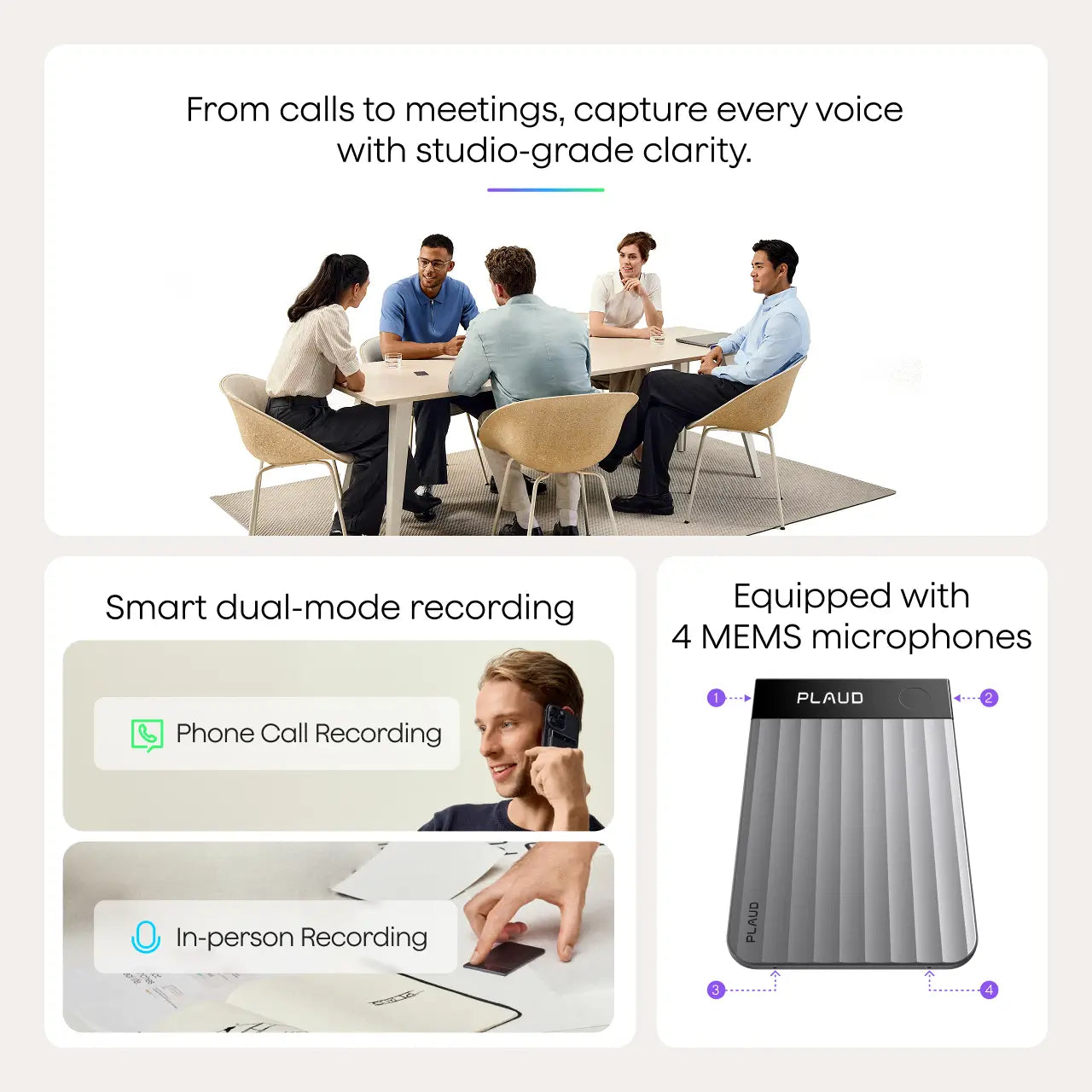
Last up, we just want to include a few criteria you can use to help you select a meeting note-taker.
-
Use case: Are you transcribing interviews, recording boardroom meetings, capturing lectures, or documenting sales calls? Different scenarios need different features. If you’re recording in-person meetings, browser-based tools will not get the job done.
-
Portability: We mostly recommend getting an easy-to-carry, handheld recorder or wearables that clip onto your body. Anything too bulky won’t be convenient enough.
-
Privacy requirements: Are you discussing sensitive information that needs end-to-end encryption and secure storage, or are these casual team check-ins? If it’s for business, you need something with security compliance certifications.
-
Reputation: Check the company’s reputation. Many AI companies are just former Kickstarter projects that don’t deliver. Look around and see what you find. Does the company have good reviews, reliable customer support, and a track record of protecting user data?
Why Choose Plaud for Your In-Person Note-Taker?
The Plaud Note is the best hardware device for recording in-person meetings for a few reasons.
We know we're biased, but nearly 1.5 million busy professionals use Plaud for its simplicity, accuracy, and pre-made note templates that automatically organize your meeting notes and save you hours of work.
It's like having a voice recorder, an AI meeting assistant, and a personal secretary all in one wearable device.
If you want to record an in-person meeting with Plaud, all you have to do is:
-
Clip it onto your shirt
-
Press record
-
Choose a template
-
Upload your audio
That's it.
Our AI-powered device handles everything from there. It transcribes the conversation, identifies speakers, pulls out action items, and turns everything into a searchable, shareable document. It can even analyze your notes for you using AI. It's that easy. Just upload your audio and let it generate meeting notes for you.









