
AI note-takers are tools that record conversations and turn them into transcripts, summaries, and notes using AI. Instead of manually taking notes during meetings (or spending hours replaying recordings later), AI tools take care of the note-taking and organization for you.
Many of our customers claim they cut their note-taking time in half or even more just by using an AI note-taking assistant.
These AI gadgets make life easier for millions of students, businesspeople, doctors, and journalists. Some common use cases include work meetings, sales calls, interviews, lectures, field recordings, medical dictation, and phone call recording.
Some tools focus on taking notes during online meetings on platforms like Zoom or Google Meet. You’ve probably seen them already. They show up as meeting bots that join calls automatically or browser extensions.
Others are built for in-person conversations and offline interactions. These are usually small physical recorders that people place on a table during meetings. They're often referred to as AI note-taking devices.
The best AI note takers, like Plaud Note, are designed to record in any situation (online, offline, in-person, over the phone, in noisy environments, etc.). They also include advanced AI features to boost productivity.
We think Plaud is the best AI note taker, but there are plenty of options. Some other well-known brands include Fathom, Otter, Tactiq, Bluedot, Granola, and Jamie.
This guide explains what AI note-takers are, how they work, and how to get the most out of them. It also covers the key features of AI note takers so you can easily choose the right tool for your needs.
What is an AI Note-Taker?

An AI note-taker is a tool that records conversations and automatically turns them into structured notes using speech recognition and large language models (LLMs).
The main difference between an AI note-taker and a standard voice recorder is what happens after the recording ends. Instead of leaving you with hours of raw audio, AI note-takers transcribe the conversation and convert it into searchable notes, summaries, and action items. This makes it easy to review what was said and reuse the information later.
Just imagine attending multiple meetings or lectures per day without having to jot a single thing down. You’d be able to focus and engage more meaningfully in the moment. And at the end of the day, your AI note taker would deliver structured notes from each meeting, organized the way you want.
AI note-takers come in a few different forms. Some are software tools that join online meetings, and others are physical devices designed for in-person conversations, lectures, interviews, or phone calls (we'll cover this more further down).
How do AI Note-Takers Work?
AI note takers work by recording audio (like a normal voice recorder) and using generative AI to create transcriptions, summaries, and notes. Here’s a quick look at how they work:
-
Audio capture: The AI tool records a conversation through a meeting app, phone call, browser extension, or physical recording device.
-
AI Transcription: Speech-to-text models convert the audio into text, often adding timestamps and separating speakers.
-
AI summaries, notes, and action items: The transcript is turned into data you can use, like summaries, key points, action items, and structured notes.
-
Organization and storage: Notes and recordings are saved in a searchable library (usually in secure cloud storage), making it easy to find past conversations or specific moments.
-
Review and reuse: Users can search, export, share, or ask questions about their notes without replaying the original audio.
What Are The Different Types of AI Note-Takers?
AI note-takers fall into one of 4 categories: Physical note-taking devices, software note-takers, wearable note-takers, and mini - or hidden - note-takers.
Let’s elaborate a bit more on each one, so you get a better idea of how they work:
Physical Note-Takers

Physical AI note-taking devices are standalone recorders that give you professional-quality audio without needing studio-grade equipment.
They're perfect for in-person conversations and work great offline, so you're not stuck worrying about WiFi or whether your phone has enough storage. The audio quality is next-level compared to what you'd get from your phone's mic, thanks to professional-grade microphones and dual-mic setups that pick up voices clearly, even in noisy rooms. We hate to brag, but our AI note-taking device comes with four MEMS microphones!
We recommend them for interviewing someone, meetings, or recording lectures.
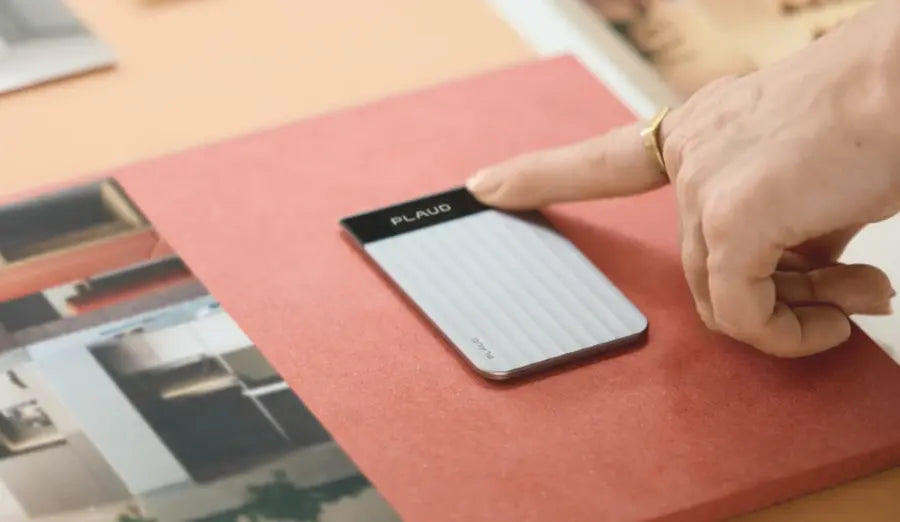
Devices like our Plaud Note are simple. Just press record, set it down, and you're good to go.
Wearable Note Takers
Wearable note takers are super popular among healthcare workers and other people who are on their feet all day.
They let you stay completely hands-free while capturing every word, which makes a huge difference when you're juggling multiple tasks. You can clip them onto your shirt, wear them as a pendant, or attach them to your collar…nobody will even know you’re recording.
This makes them perfect for doctors doing rounds, nurses documenting patient interactions, or anyone who needs to capture information on the go. They're also great for interviews, lectures, and those spontaneous conversations that happen throughout the day when pulling out your phone would be awkward or inconvenient. Just wear it, press record once in the morning, and let it run all day without thinking about it.
Software Note-Takers
Next up: software solutions that integrate seamlessly with virtual meetings.
These are the tools that plug directly into Zoom, Teams, Google Meet, and other platforms you're probably already using for work.
Further reading: Check out our review of the best AI note-takers for Zoom.
The big advantage here is real-time transcription. You get AI summaries and notes generated automatically while the meeting is still happening, so you can focus on the conversation instead of frantically typing.
If you spend most of your day on video calls, this is the best option easily. The downside is that you need a solid internet connection for everything to work, and most of these tools come with time limits or usage caps unless you pay for premium plans.
They also don't produce the same level of audio quality, because you're using your computer audio rather than a microphone.
Secret Note-Takers
Secret note-takers are devices designed for discreet, inconspicuous recording when you don't want people to know they're being recorded.
But we advise you to be really careful with these.
Always check your local laws, because recording someone without their consent is illegal in most jurisdictions.
In states like California, Florida, and Illinois, you need everyone's permission to record, and breaking that law can lead to serious fines or even criminal charges.
These devices are usually small and easy to hide. They might look like pens, keychains, or other everyday objects.
But just because you can record secretly doesn't mean you should. Even in one-party consent states, there are situations where secret recording crosses the line, like in places where people expect privacy. If you're considering this route, talk to a lawyer first. It's not worth the legal trouble.
While we're on the subject, let's get to into the legal stuff.
Are AI Note-Takers Legal?

Yes, AI note-takers are legal to use, but it depends on what (or who…) you’re recording. If you use them for illegal activity (such as secretly recording someone), you may find yourself in legal trouble.
The main issue is consent.
Recording laws differ by region. Some states have one-party consent laws, meaning only one person in the conversation needs to know it’s being recorded (and that can be you). Other regions require all-party consent (everyone must agree to the recording before you tap record).
Read more about recording laws in US jurisdictions here
Many countries outside the U.S. follow similar rules.
Online meetings usually make this clearer. Platforms like Zoom or Google Meet often show recording indicators or notifications, which help establish consent. In-person and phone recordings require more care, especially in professional settings.
There are also privacy and data rules to consider. If recordings include sensitive information like medical details, legal discussions, or personal data, you’ll need to get clear consent even in one-party states.
What’s the Best AI Note-Taker?
There’s no single best AI note-taker for everyone. The right choice depends on how you record conversations, where they happen, and what you want to do with the notes afterward.
If you attend online and in-person meetings, you probably want to choose a physical voice recorder that can handle all types of environments. If you primarily meet online, a software-only option might be more convenient.
Here are a few of the most popular AI note-taking tools:
-
Plaud: We are the world’s #1 note-taking brand. Plaud is a hardware-based AI note-taker designed for in-person meetings, phone calls, and offline recording. It automatically transcribes audio and generates structured notes after syncing.
-
Fathom: A free personal note taker for Zoom meetings that records, transcribes, and summarizes calls in real time.
-
Fireflies: A meeting bot that joins online calls to capture transcripts, summaries, and searchable notes across platforms. It’s built for large teams that meet frequently.
-
Otter: Another bot-based tool, Otter is a budget-friendly personal note taker for online meetings and real-time notes.
-
Tactiq: A Chrome-based browser extension that captures live meeting transcripts, mainly for Google Meet and Zoom.
-
Bluedot: Bluedot is a meeting organizer and summarizer built for async review, video capture, and team collaboration.
-
Granola: If you still take manual notes, Granola enhances them with AI (note: it doesn’t record audio).
-
Jamie: This AI meeting assistant generates structured notes and action items from recorded conversations.
To see our complete review of the best AI note-takers, please read our ranking here.
What Can AI Note-Takers Do?
A super simple way to explain AI note takers is that they record audio, transcribe it, and generate notes automatically. These days, they can do a lot more than that. Here are some of the things that AI note takers can do to save time and improve productivity:
-
Record conversations: Like traditional recorders, most AI note takers capture audio files and save them for later review. Check out our guide on how to record a conversation to learn more.
-
Generate AI transcripts: AI tools convert speech into text with timestamps and speaker labels.
-
Generate AI summaries and notes: They create skimmable summaries and detailed notes that highlight key points, decisions, and outcomes.
-
Customize notes and summaries: Advanced tools include template libraries and allow you to customize your output based on your needs, compliance regulations, branding, etc.
-
Extract action items: AI can automatically identify the most important tasks, follow-ups, and next steps mentioned during the conversation.
-
Create searchable notes: Your notes and transcripts should turn into a searchable database that you can use to quickly pull up info from past meetings.
-
Support multiple languages: Multilingual support means you can transcribe conversations in different languages (the number of languages varies between tools).
-
Integrate with other tools: You can export notes directly or share via other tools you use, like Slack, Google Workspace, and Notion.
Use Cases for Note-Takers and Summarizers
AI note takers are used by millions of people worldwide for countless personal and professional reasons. These are some of the most common use cases.
Physical Meetings
It’s tough to take notes during in-person meetings while still feeling engaged (and respectful to the speaker). AI note-takers can record these conversations clearly and help you focus in the moment. Even in meetings with multiple speakers, they can record conversations, identify speakers, and generate summaries.
Online Meetings
Many software-based AI note takers help take notes during Zoom, Google Meet, or Microsoft Teams calls. They usually join automatically as a bot participant or run in the background. If you need real-time transcription and notes, these tools can help. But they often require an internet connection and come with time limits (even on paid plans).
Phone Call Recording
Physical AI note takers equipped with Voice Pick-Up (VPU) sensors can record phone calls without having to switch to speakerphone. These are commonly used for interviews, client calls, or verbal notes taken on the go.
Sales Calls
Sales teams use AI note-takers to log call transcripts, pull out objections and next steps, and sync notes with CRMs. This helps reduce manual admin work after every call.
Healthcare
In healthcare settings, AI note-takers are used for clinical dictation, patient conversations, and documentation. Accuracy and privacy are more important than speed or convenience here. Clinicians prioritize HIPAA-compliant AI note takers with strong data security track records. In fact, healthcare workers are one of our largest customer bases. Doctors, nurses, and other hospital or private practice support staff often use wearable AI devices to take notes without intruding on the patient’s daily life.
Legal Work
Legal professionals use AI note-takers for client meetings, depositions, and internal discussions. Searchable transcripts and clear records are their priorities. Accuracy is also a must because small AI errors and confusing audio can lead to big problems in cases.
Education
Students use AI note-takers to record lectures, generate study notes, and review complex material later. This can be helpful when lectures move quickly or cover dense topics. Physical recorders are ideal for students, as most attend a blend of online and in-person classes.
What Makes a Reliable AI Note-Taker?

Reliable note takers offer accurate transcription, customizable AI features, and secure storage. But most of all, they work when you need them to. There’s nothing more annoying than hitting a meeting time limit during an important call or having your note taker break down due to spotty WiFi.
Reliability comes down to a few practical factors:
-
High transcription accuracy: A reliable tool captures what was said, even with background noise, overlapping speakers, or different accents. If the transcript is wrong, everything built on top of it is too.
-
Speaker identification: Speaker separation keeps notes readable and avoids confusion later. If your tool can’t do this, it’ll be useless for any multi-speaker meetings.
-
Clear summaries, notes, and action items: Good tools turn your text into data you can use (so you don’t have to go searching through transcripts and audio files).
-
Searchable notes and transcripts: The information you gain from meetings should be easy to store, recall, and organize.
-
Offline recording: Most AI features only work online. But you should still be able to record offline (and then generate AI transcripts, etc., later when you have a connection).
-
Editable notes and transcripts: Did your meeting include slides or visual aids? Most do. You should be able to manually add these to your AI notes.
-
Microphone quality: Microphone quality affects audio quality…which in turn affects transcription accuracy. That means if you record via your phone or laptop’s mic, you may get poor results even from good software. Use a physical device with multiple mics to get clear audio and higher accuracy.
-
Battery life: If you have a physical recording device, you don’t want to be tethered to a charger every day. Look for recorders with 20-30 hours of continuous recording per charge.
-
Storage: Some tools offer limited storage, meaning your meeting notes from over 3 months ago might just disappear. Reliable tools offer unlimited storage, so you can benefit from the data you collect long-term.
-
Time limits: Free versions of software-based tools often limit you to 30-minute meetings. Even paid versions cap you at 2 hours. Physical devices allow you to record for as long as you want.
-
Privacy and data security: Reliability also means trust. Tools must have encryption, access controls, and data protection standards, especially when conversations include sensitive information.
What Are the Challenges of Using AI Note-Takers?
Generally, AI note takers make life a lot easier. However, there can be challenges depending on the tool you use. Some tools have learning curves that might require some dedication. And if you’re not used to recording conversations, you’ll need to ensure that you’re always recording legally.
These are a few common challenges that show up across most tools.
-
Accuracy isn’t guaranteed: Transcription accuracy depends on a lot of factors, such as background noise, mic quality, overlapping speakers, and technical jargon. Tools like Plaud achieve up to 98% accuracy, but others are lower (75-85%). Even good tools may need light cleanup after complex conversations.
-
Consent and privacy concerns: Recording conversations can raise legal and ethical questions. Users are responsible for getting consent and handling sensitive data correctly. Always check the recording laws in your state before you start recording.
-
Limited context: AI can miss nuance, sarcasm, or implied meaning. Summaries may oversimplify discussions if the context isn’t clear in the audio.
-
Workflow adjustments: Some tools require extra setup, manual exports, or post-meeting steps. If everyone isn’t aligned, this might slow things down instead of saving time.
How to Choose the Right AI Note Taker
Picking the right AI note taker depends on your needs and the type of recording you do.
Here are some things to think about before choosing an AI note taker.
-
Start with where you’ll use it most: Do you need to record in-person meetings, Zoom/Meet calls, phone calls, or a mix? Pick tools built for your recording environments.
-
Decide what output you need: Do you just need simple transcripts and notes? Or detailed, compliance-ready summaries and action items? Make sure you shop for the features you need, but don’t pay more for ones you won’t use.
-
Pay attention to transcription accuracy: The quality of all your AI output depends on this. If you record in many environments, make sure your tool can handle multiple speakers, noisy rooms, and jargon.
-
Check how it fits your workflow: If your team lives in Zoom, Google Meet, Slack, or a CRM, choose something that exports or integrates cleanly (or you’ll stop using it).
-
Confirm privacy and permissions: Make sure it supports consent-friendly recording, secure storage, and the privacy standards your work requires.
-
Compare total cost, not just the sticker price: Some tools have higher upfront costs but save a lot in the long run. Look at minutes limits, paywalls for key features, storage limits, and whether you’ll need a subscription.
How to Use an AI Note-Taker?
Using an AI note-taker for meetings is really easy. You just need to follow a few simple tips to get started.
For Online Meetings
Most AI note-takers integrate directly with platforms like Zoom, Google Meet, or Microsoft Teams. Simply connect the tool to your meeting platform, then invite it to join your call. The AI will automatically record, transcribe, and generate notes in real-time. Make sure to inform participants that the meeting is being recorded before you start.
For In-Person Meetings
For face-to-face conversations, use a physical AI recording device or your phone's note-taking app. Place the recorder in the center of the table, equidistant from all speakers, to ensure clear audio capture. Press record before the meeting begins, and let the AI handle the rest. After the meeting, sync your recording to process the transcription and generate organized notes and action items.





