



The new Plaud Intelligence is the most powerful version yet. For the first time, Plaud can go beyond capturing your conversations and complete the work for your team.
What's new for Plaud Team
Plaud Agent
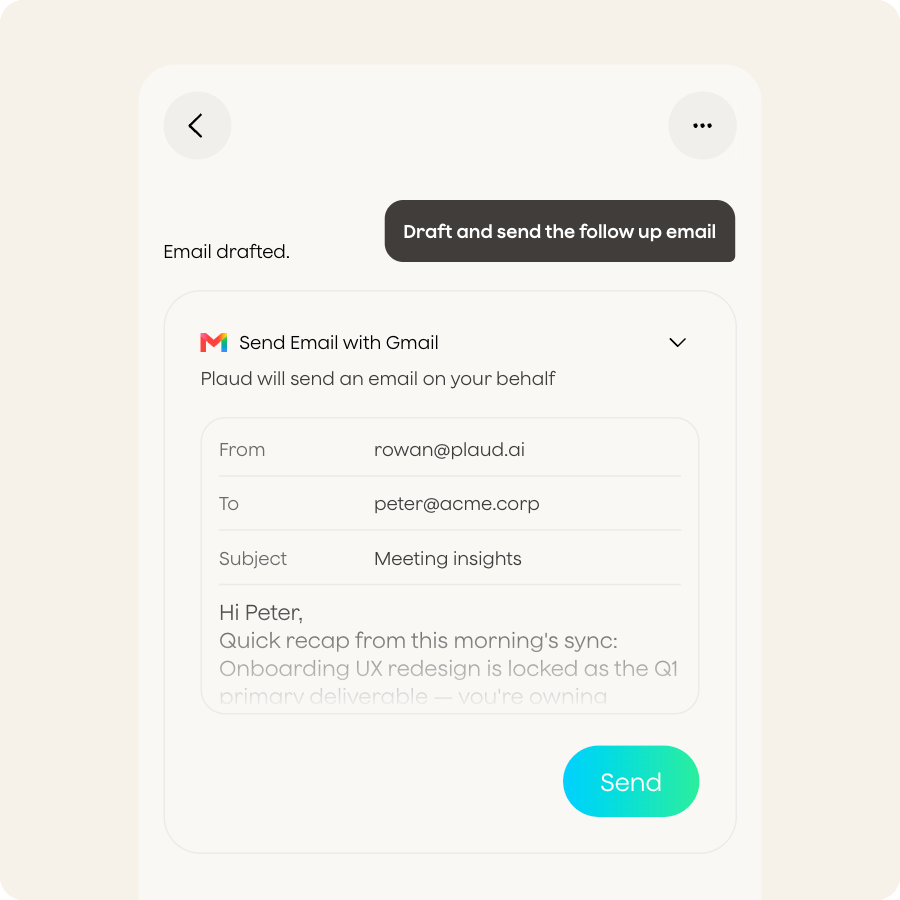
Every Member can now give Plaud Agent a task. It can draw on your Team workspace's shared meeting context, produces a finished output, and delivers it where it needs to go.
Members can ask it to:
- Draft follow-up emails from a call
- Share to-dos with teammates
- Create documents in the tools your team already uses
Connectors
Plaud Agent works with the tools your team already uses. Connectors available at launch include Slack, Gmail, Google Docs, Google Calendar, Outlook, Notion, Linear, and Zapier. Additional Microsoft 365 integrations are coming soon, and a Salesforce connector for syncing notes from Plaud is on the roadmap.
Team Skills (coming in a follow-up update)

Skills are custom instructions for your Plaud Agent so that you get consistent output every time. Instead of typing out the same instructions to Plaud Agent every time, just call on the skill and Plaud Agent executes based on the embedded instructions automatically.
Team Skills extend this to the whole workspace. They are not part of the initial release. When they arrive, an Admin or Member will be able to define a Skill once, and every Member in the workspace will be able to apply it with their own conversations.
What stays the same
Your plan and pricing do not change. Transcription and the default AI summary for each recording remain unlimited, exactly as they are today.
All existing recordings and notes carry over. There is nothing to migrate and nothing to set up again.
Plaud Credits in your team workspace
Plaud Intelligence adds a second balance to your workspace alongside transcription minutes.
Transcription minutes cover everything your plan has always covered: first-time transcription in 112+ languages, speaker labels, the default AI summary, and automatic action items.
Plaud Credits are used when Plaud Agent does work: generating a document, taking action in a connected tool, or answering questions about your meeting context.
Transcription, re-transcription, and the default AI summary for each recording do not use Plaud Credits. Those stay unlimited on Plaud Team, exactly as they are today.
The launch gift
Every occupied seat in your Team workspace receives a one-time gift of Plaud Credits when the update arrives.
Plaud Credits on an unoccupied seat become available once a Member joins and takes that seat.
The free launch grant does not renew monthly. For full details on expiry, what happens when Credits run out, and how to buy more, visit the Plaud Credits page.
Admin visibility and top-ups
After your team updates, your billing dashboard shows Plaud Credits usage across the workspace. If a Member runs out, they are not automatically charged. Top-up packs remain valid for one year.
Before you update
1. Get familiar with Plaud Credits
Read through this guide and the Plaud Credits page before Members start asking questions. The key points: Credits are separate from transcription minutes, every occupied seat gets a one-time launch gift, and you can monitor usage in your billing dashboard.
2. Tell your Members what is changing
Let them know when to expect the update. The main things to communicate: Plaud Agent is now available, a new Credits balance has been added, and their recordings and data are all intact.
3. Update together as a team
While some Members are on the new version and others are not, shared Team files and shared links may not work as expected. Pick a short window and ask your whole team to update at the same time.
4. The update is one-way
Once a Member updates their Plaud Mobile App, their account moves to the new version. There is no option to revert.
After the update
Members will see a refreshed workspace layout: a new file system, Plaud Agent chat, and a calendar-first view. The one Team-specific change is that Team files now sit under Library, below My files.
Your billing dashboard will show a Plaud Credits section alongside your existing usage data. You can see each Member's usage and purchase top-up Credits from there.
FAQ: Plaud Team
Can we go back to the previous version after upgrading?
No. The upgrade is one-way.
What happens if only some of my team updates?
Everyone can keep working, but shared Team files and shared links may not behave as expected until every Member has updated. Updating together avoids this.
Does our billing change when we update?
Your plan and subscription price do not change. The update adds a separate Plaud Credits balance. Your transcription allowance, plan renewals, and any redemption codes all continue as before. For full details, see the Plaud Credits page.
I am part of more than one Team workspace. How does this affect me?
The update happens at the account level. Once you update your Plaud Mobile App, every workspace under your account moves to the new version together.
I only use Plaud Web or Plaud Desktop. How do I get the update?
The update starts from the Plaud Mobile App. Once your account is updated there, Plaud Web updates automatically and Plaud Desktop will prompt you to update.









